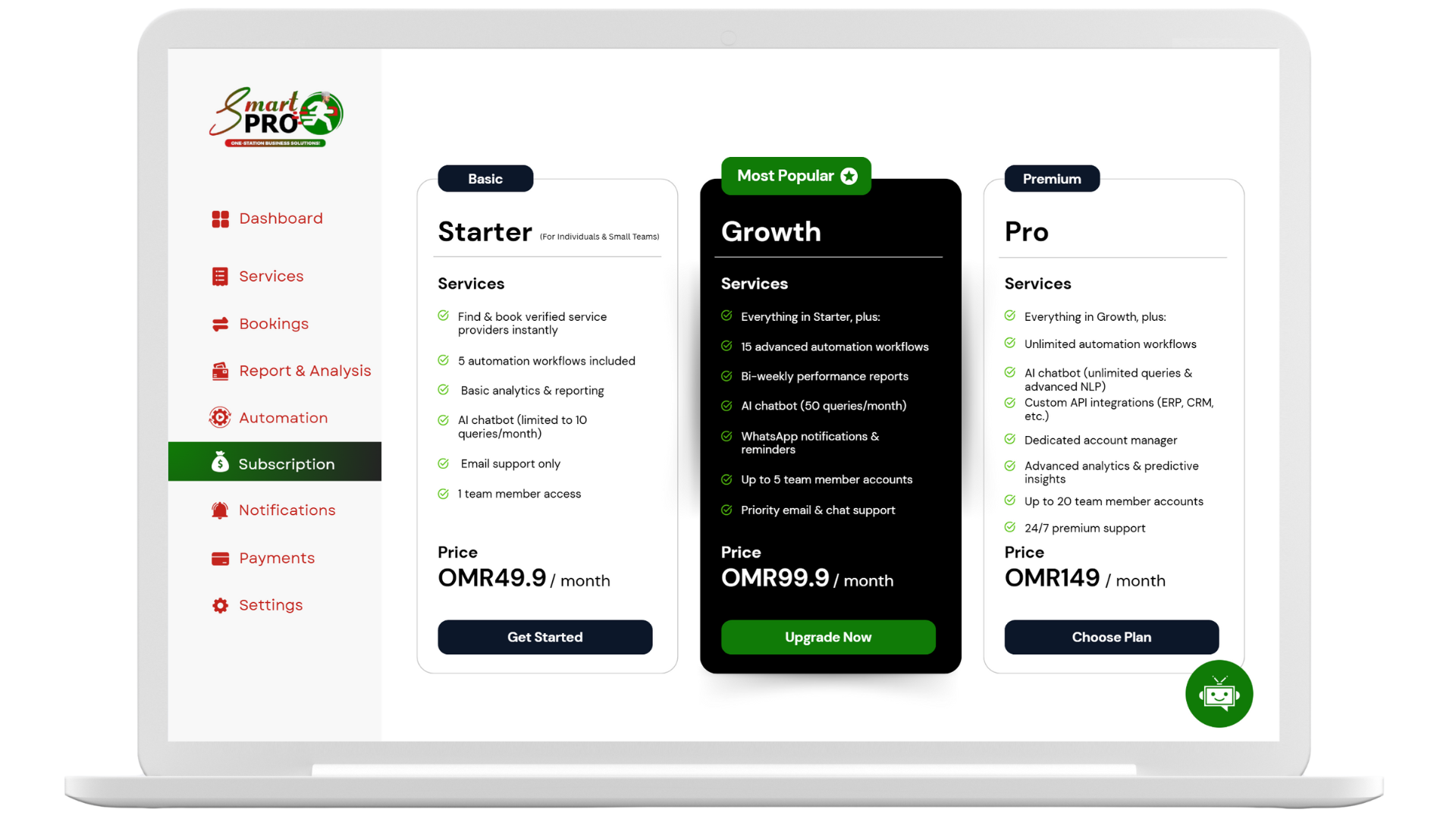

Introduction to SmartPRO Hub Documentation
Welcome to the SmartPRO Hub Documentation — your complete resource for understanding, implementing, and maximizing the value of SmartPRO Hub, the GCC's first Arabic-first, business enablement platform for professional services.
This knowledge base brings together all technical, strategic, and design insights from our extensive research, product development, and market validation process. Whether you're a client, service provider, integration partner, or technical contributor, you'll find detailed guidance tailored to your role and needs.
SmartPRO Hub is more than a marketplace — it is an operating system for trusted business services in Oman and across the GCC, designed with regional compliance, cultural relevance, and cutting-edge technology at its core. This documentation reflects our mission to empower professionals with tools, integrations, and workflows that match global technical excellence with deep local understanding.
What You'll Find Here
Our documentation is structured by sections. Click any item to jump directly to that page or subsection.
- Summary
- Services
- Features
- Roadmap
- Integration
-
Innovations
- Executive Summary
- User Onboarding & Verification
- Booking & Scheduling
- Contract Generation & Management
- Payments & Escrow
- Ratings, Reviews, and Trust Signals
- Mobile Responsiveness & Multilingual Support
- Business Model & Monetization
- Technical Architecture & Implementation
- Implementation Prioritization Matrix
- Phased Implementation Approach
- Conclusion
- Design
- Architecture
- Pain Points
Summary
Strengths
- The executive summary effectively introduces SmartPRO Hub as a solution to fragmented professional services in Oman and the GCC
- Clearly identifies the target market and core user roles (Clients, Providers, Admins)
- Successfully positions the platform as more than a marketplace but as "business enablement infrastructure"
- Highlights key pain points the platform addresses (verification, contracts, pricing transparency)
- Professional tone appropriate for executive audiences
Suggestions for Improvement
- Add specific metrics or market size data to strengthen the business case (e.g., "% of businesses in Oman struggle with service procurement")
- Include a brief mention of the competitive landscape to establish market positioning immediately
- Consider adding 1-2 sentences about revenue model or business sustainability
- Incorporate a stronger call-to-action or next steps for investors/stakeholders
- Reference any existing partnerships or early adopters to build credibility
Missing Elements
- No mention of timeline to market or current development stage
- Lacks specific investment requirements or funding context if intended for investors
- No reference to the team's expertise or unique qualifications to execute this vision
- Absence of any early traction indicators or validation points
Overall Evaluation
| Criteria | Rating (1-5) | Notes |
|---|---|---|
| Relevance | 4 | Strong alignment with regional market needs |
| Criteria | Rating (1-5) | Notes |
|---|---|---|
| Clarity | 4 | Clear communication with appropriate tone |
| Strategic Value | 3 | Good foundation but lacks specific metrics and competitive positioning |
| Completeness | 3 | Missing key elements for investment context |
| Differentiation | 4 | Successfully positions as unique regional solution |
Services
Suggestions for Improvement
- Include the actual Service Offering Matrix content (appears to be missing or incomplete)
- Add specific examples of service packages with pricing ranges
- Include visual representation of the service categories and their relationships
- Provide more detail on how services are categorized and standardized
- Add information about quality control and service level agreements
Missing Elements
- No detailed breakdown of service categories and examples
- Missing pricing strategy or guidelines for different service types
- Lacks information on service onboarding and quality verification process
- No mention of service customization options or limitations
- Absence of competitive benchmarking for similar service offerings
Overall Evaluation
| Criteria | Rating (1-5) | Notes |
|---|---|---|
| Relevance | 3 | Concept is relevant but lacks specific details |
| Clarity | 2 | Section appears incomplete with missing matrix content |
| Strategic Value | 3 | Good foundation but needs more development |
| Completeness | 2 | Significant content appears to be missing |
| Differentiation | 3 | Basic concept is sound but needs more unique elements |
SmartPro Platform Features: A Comprehensive Guide
This document provides a comprehensive and professional overview of the key features offered by the SmartPro platform. Designed to empower businesses and streamline operations, SmartPro integrates advanced analytics, robust automation, and efficient management tools to foster growth and enhance user experience. Each feature is explained in detail, accompanied by examples, diagrams, and relevant data to ensure a thorough understanding of its capabilities and benefits.
Powerful Reports & Actionable Insights
SmartPro's reporting and analytics suite provides businesses with the tools necessary to gain deep insights into their operations, track performance, and make data-driven decisions. This feature transforms raw data into meaningful, actionable intelligence through advanced analytics, real-time dashboards, performance tracking, and custom reports.
Advanced Analytics
Advanced Analytics in SmartPro goes beyond basic reporting, employing sophisticated techniques to uncover hidden patterns, predict future trends, and optimize business processes. This capability allows users to delve deeper into their data, identifying correlations and causal relationships that might not be apparent through traditional analysis methods. For instance, businesses can analyze customer behavior to predict purchasing patterns, optimize marketing campaigns, or identify potential churn risks.
Example: A service-based business using SmartPro's Advanced Analytics might discover that customers who book appointments on weekends tend to utilize specific services more frequently. This insight could lead to targeted weekend promotions for those services, thereby increasing revenue.
Real-time Dashboards
Real-time Dashboards provide an immediate, up-to-the-minute view of critical business metrics. Unlike static reports, these dynamic dashboards update continuously, offering live insights into sales figures, operational efficiency, customer engagement, and more. This real-time visibility enables rapid response to changing market conditions or operational issues, facilitating agile decision-making.
Example: A manager can monitor the number of active appointments, workflow progress, and revenue generated throughout the day on a single dashboard. If a sudden drop in bookings is observed, they can immediately investigate the cause and implement corrective measures, such as launching a flash promotion or reallocating staff.
Performance Tracking
Performance Tracking within SmartPro allows businesses to monitor and evaluate their performance against predefined key performance indicators (KPIs). This includes tracking individual employee performance, departmental efficiency, or overall business growth. By continuously monitoring these metrics, businesses can identify areas of strength and weakness, ensuring continuous improvement and alignment with strategic goals.
Example: A company can track the average time taken to complete a service, customer satisfaction scores, or the conversion rate of leads. This data can then be used to identify training needs for staff, optimize service delivery processes, or refine sales strategies.
Custom Reports
SmartPro's Custom Reports feature provides the flexibility to generate tailored reports that meet specific business requirements. Users can define the data points, metrics, and visualization formats, allowing for highly personalized insights. This capability is particularly useful for in-depth analysis of niche areas or for presenting data to different stakeholders with varying information needs.
Example: A marketing team might create a custom report to analyze the effectiveness of a recent digital advertising campaign, focusing on metrics like click-through rates, lead generation, and cost per acquisition, which might not be available in standard reports.
Data Flow for Reports & Actionable Insights
Here's a visual representation of how data flows within SmartPro to generate powerful reports and actionable insights:
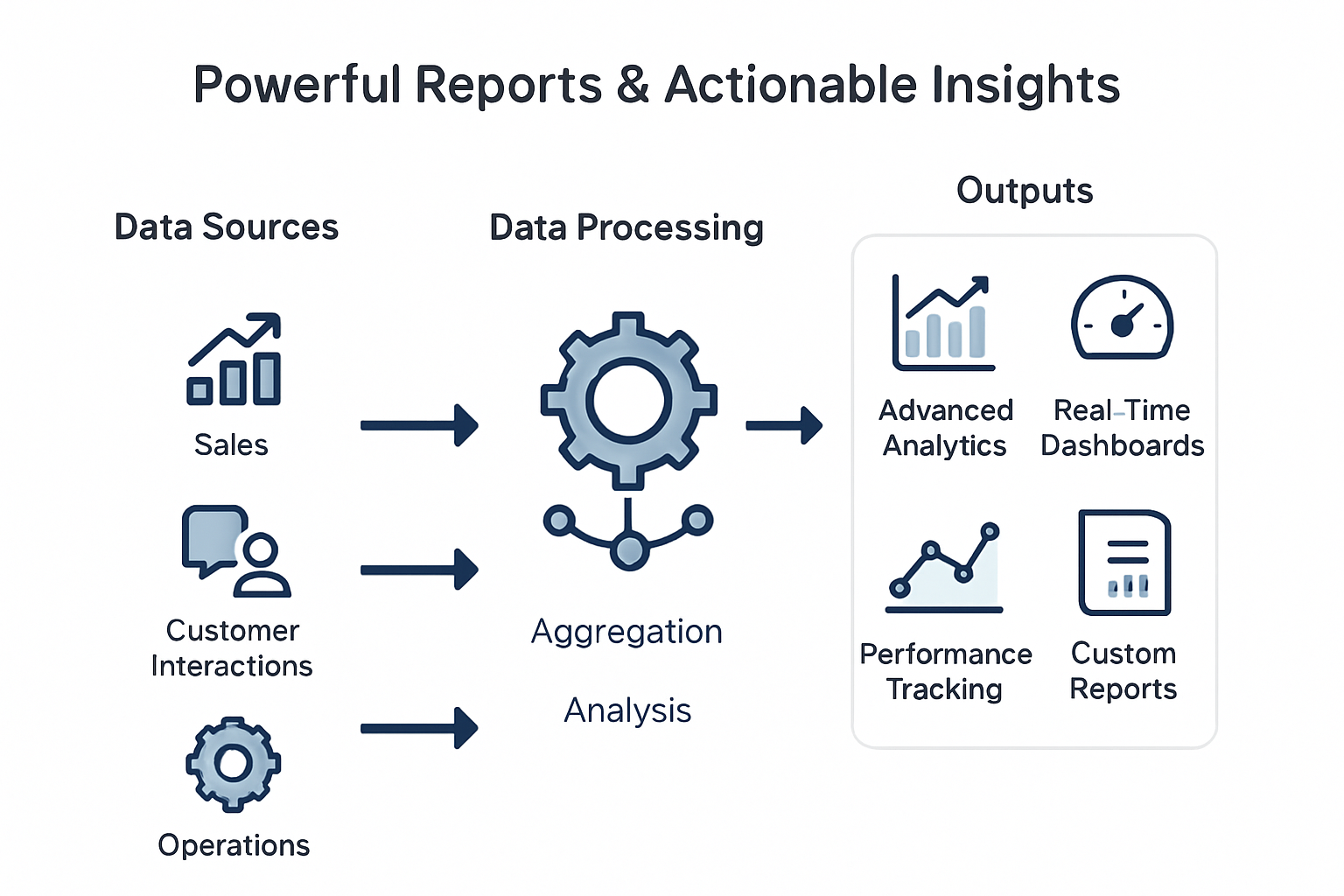
Data Flow Diagram: From raw data sources through processing to actionable insights
This diagram illustrates the process from raw data sources (Sales, Customer Interactions, Operations) through data processing (Aggregation, Analysis) to the final outputs (Advanced Analytics, Real-Time Dashboards, Performance Tracking, Custom Reports).
Discover Trusted Service Providers in One Click
SmartPro simplifies the process of finding and connecting with reliable service providers, bringing all necessary business solutions under one unified platform. This feature is crucial for businesses looking to expand their network, outsource tasks, or find specialized services quickly and efficiently. It emphasizes instant connections, verified listings, and quick appointment setting, ensuring a seamless experience for users.
Instant Connections
Instant Connections enable users to rapidly establish contact with service providers that match their specific needs. This eliminates the traditional time-consuming process of searching, vetting, and initiating contact with potential partners. SmartPro's platform facilitates immediate communication, allowing businesses to quickly move from identification to engagement.
Example: A small business needing urgent IT support can use SmartPro to instantly find and connect with available IT service providers in their area, rather than sifting through numerous search results or waiting for referrals.
Verified Listings
Verified Listings are a cornerstone of trust and reliability within the SmartPro ecosystem. Each service provider listed on the platform undergoes a rigorous verification process, ensuring their credibility, qualifications, and adherence to quality standards. This pre-vetting saves businesses significant time and reduces the risk associated with engaging unverified third parties.
Example: Before hiring a marketing agency, a business can rely on SmartPro's verified listings to ensure the agency has a proven track record and legitimate credentials, providing peace of mind and reducing potential liabilities.
Quick Appointments
Quick Appointments streamline the scheduling process between businesses and service providers. Once a suitable provider is identified, SmartPro allows for immediate appointment booking directly through the platform. This integration reduces administrative overhead, minimizes scheduling conflicts, and accelerates the initiation of services.
Example: A consultant can quickly book a meeting with a legal advisor found on SmartPro, instantly checking their availability and confirming the appointment without back-and-forth emails or phone calls.
Process for Discovering Trusted Service Providers
Here's a visual representation of how SmartPro facilitates the discovery of trusted service providers:
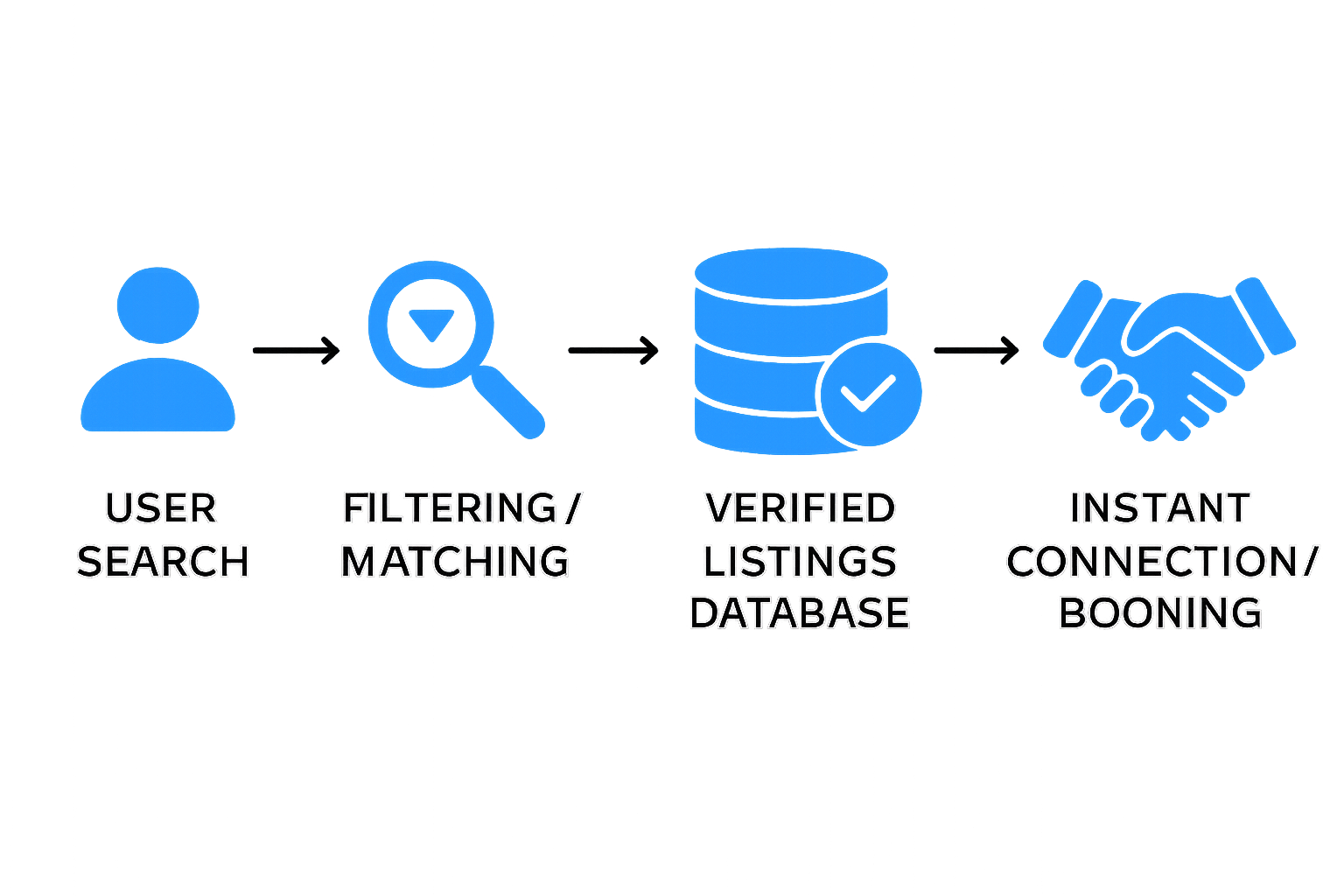
Process Diagram: User journey from service search to instant connection
This diagram illustrates the user's journey from searching for a service to instantly connecting or booking with a verified provider, highlighting the efficiency and reliability of the process.
Simplify Processes & Automate Your Workflow
SmartPro's intelligent automation tools empower businesses to take full control of their operations, significantly reducing manual effort, saving time, and minimizing errors. This suite of features enables businesses to run smarter and more efficiently, from contract management to social media interactions.
Contract Automation
Contract Automation within SmartPro streamlines the entire lifecycle of contracts, from creation and negotiation to execution and management. This feature automates repetitive tasks associated with contracts, such as generating standard agreements, tracking approvals, and setting reminders for renewals. By reducing manual intervention, it accelerates contract cycles, enhances compliance, and minimizes the risk of human error.
Example: A real estate agency can use SmartPro to automatically generate lease agreements for new tenants based on pre-defined templates and client data, significantly cutting down the time spent on paperwork and ensuring all necessary clauses are included.
Workflow Automation
Workflow Automation allows businesses to design, implement, and manage automated sequences of tasks and processes. This involves defining triggers, actions, and conditions that dictate how work flows through the organization. By automating workflows, businesses can ensure consistency, improve efficiency, and free up employees to focus on more strategic activities.
Example: When a new client signs up, SmartPro can automatically trigger a series of actions: send a welcome email, create a new client folder in the system, assign a dedicated account manager, and schedule an initial consultation, all without manual intervention.
Document Automation
Document Automation in SmartPro focuses on automating the creation, processing, and management of various business documents. This includes generating invoices, reports, proposals, and other essential paperwork. By leveraging templates and data integration, businesses can produce accurate and professional documents rapidly, reducing the time and resources typically consumed by manual document handling.
Example: A consulting firm can automate the generation of project proposals, pulling in client-specific details, service descriptions, and pricing from their database, ensuring consistency and accuracy across all proposals.
Social Automation
Social Automation enables businesses to manage and optimize their social media presence more efficiently. This feature automates tasks such as scheduling posts, monitoring mentions, responding to common inquiries, and analyzing engagement metrics. By automating these activities, businesses can maintain an active and responsive social media presence without requiring constant manual oversight.
Example: A retail business can schedule promotional posts to go live at optimal times across multiple social media platforms, automatically respond to frequently asked questions from customers, and track the performance of their campaigns, all through SmartPro.
Typical Workflow Automation Process
Here's a visual representation of a typical workflow automation process:
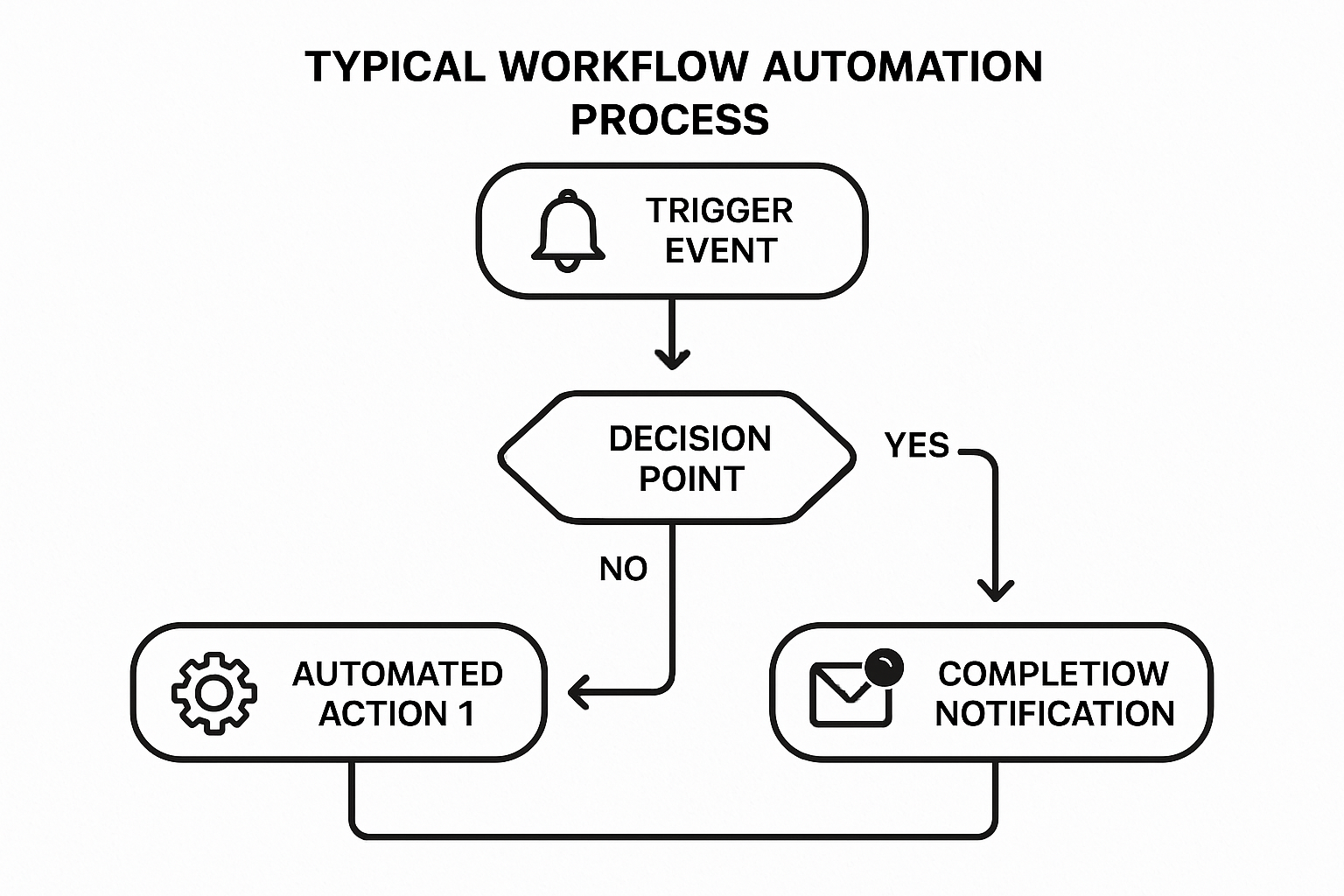
Workflow Automation Diagram: From trigger event through decision points to automated actions and completion
This diagram illustrates how a trigger event initiates an automated process, which can involve decision points and various automated actions, ultimately leading to completion and notification, thereby streamlining operations.
Manage Your Business Anytime, Anywhere
SmartPro provides the flexibility and accessibility needed to manage your business operations seamlessly, regardless of your location. This feature ensures that businesses remain connected and productive, offering smart scheduling, seamless automation, live notifications, and comprehensive workflow control, all accessible from any device.
Smart Scheduling
Smart Scheduling within SmartPro offers an intuitive and efficient way to manage appointments and bookings. It goes beyond simple calendar management by incorporating intelligent algorithms that optimize schedules, prevent double bookings, and suggest the best times for appointments based on various factors like staff availability, resource allocation, and client preferences. This ensures maximum efficiency and client satisfaction.
Example: A medical clinic can use SmartPro's Smart Scheduling to automatically fill cancellation slots, send automated reminders to patients, and manage doctor availability across multiple locations, significantly reducing administrative burden and improving patient flow.
Seamless Automation
Seamless Automation refers to the integrated and interconnected nature of SmartPro's automation capabilities across different business functions. This means that actions taken in one part of the system can automatically trigger responses or updates in other related areas, creating a cohesive and highly efficient operational environment. This reduces manual data entry, minimizes errors, and ensures consistency across all processes.
Example: When a client books an appointment through the SmartPro system, the Seamless Automation feature can automatically update the staff's calendar, send a confirmation email to the client, and trigger a notification to the relevant service provider, all without any manual intervention.
Live Notifications
Live Notifications provide real-time alerts and updates on critical business activities. These notifications can be customized to inform users about new bookings, payment confirmations, changes in schedules, client inquiries, or any other significant event. This immediate communication ensures that businesses can respond promptly to opportunities or issues, maintaining operational agility and responsiveness.
Example: A salon owner receives a live notification on their mobile device every time a new appointment is booked or an existing one is cancelled, allowing them to manage their schedule on the go and make immediate adjustments if necessary.
Workflow Control
Workflow Control in SmartPro gives businesses comprehensive oversight and management capabilities over their automated processes. This feature allows users to define, monitor, and adjust workflows to ensure they align with business objectives and operational requirements. It provides tools to track the progress of tasks, identify bottlenecks, and make real-time adjustments to optimize efficiency and ensure compliance.
Example: A project manager can use Workflow Control to monitor the progress of different tasks within a project, reassign tasks if a team member is overloaded, or pause a specific workflow if an unexpected issue arises, ensuring that projects stay on track and resources are optimally utilized.
Simplify Scheduling & Manage Your Bookings
SmartPro offers intuitive and powerful scheduling tools designed to give businesses complete control over their appointments and bookings. This feature streamlines the entire booking process, from initial scheduling to automated reminders, ensuring efficiency and reducing administrative burdens.
Smart Booking System
The Smart Booking System is the core of SmartPro's scheduling capabilities, providing an intuitive interface for clients to book services and for businesses to manage their calendars. This system is designed for ease of use, allowing clients to quickly find available slots and book appointments, while businesses can configure their availability, service offerings, and pricing with precision. It supports various booking scenarios, including one-on-one appointments, group sessions, and recurring bookings.
Example: A fitness studio can use the Smart Booking System to allow clients to book classes online, view instructor availability, and manage their class schedules. The system can automatically adjust availability as slots are filled and prevent overbooking, ensuring a smooth experience for both clients and staff.
Real-time Schedule Updates
Real-time Schedule Updates ensure that all calendars and booking information are always current. Any changes made by clients or staff—such as cancellations, rescheduling, or new bookings—are immediately reflected across the platform. This eliminates the risk of double-bookings or missed appointments due to outdated information, fostering greater accuracy and reliability in scheduling.
Example: If a client cancels an appointment, the slot immediately becomes available for others to book, and the relevant staff member's calendar is updated instantly. This dynamic updating maximizes resource utilization and minimizes lost revenue from empty slots.
Document & Payment Integration
SmartPro's Document & Payment Integration seamlessly combines booking management with essential administrative tasks. This feature allows businesses to attach necessary documents (e.g., consent forms, intake questionnaires) to bookings and process payments directly within the scheduling workflow. This integrated approach simplifies client onboarding, ensures all required paperwork is completed, and facilitates secure financial transactions.
Example: A medical practice can require new patients to fill out an online intake form before their appointment and process co-payments at the time of booking, all through the SmartPro platform. This reduces check-in time and ensures all necessary information and payments are collected upfront.
Automated Reminders
Automated Reminders are a critical component of SmartPro's scheduling tools, designed to significantly reduce no-shows and improve client attendance. The system automatically sends customizable reminders via SMS or email to clients prior to their appointments. These reminders can include appointment details, location information, and options to confirm, reschedule, or cancel, providing convenience for clients and reducing administrative effort for businesses.
Example: A hair salon can configure SmartPro to send an SMS reminder to clients hours before their appointment, with a link to confirm their attendance. This proactive communication helps clients remember their bookings and allows the salon to fill any newly available slots from cancellations.
Quick Booking System Process
Here's a visual representation of the quick booking system process:
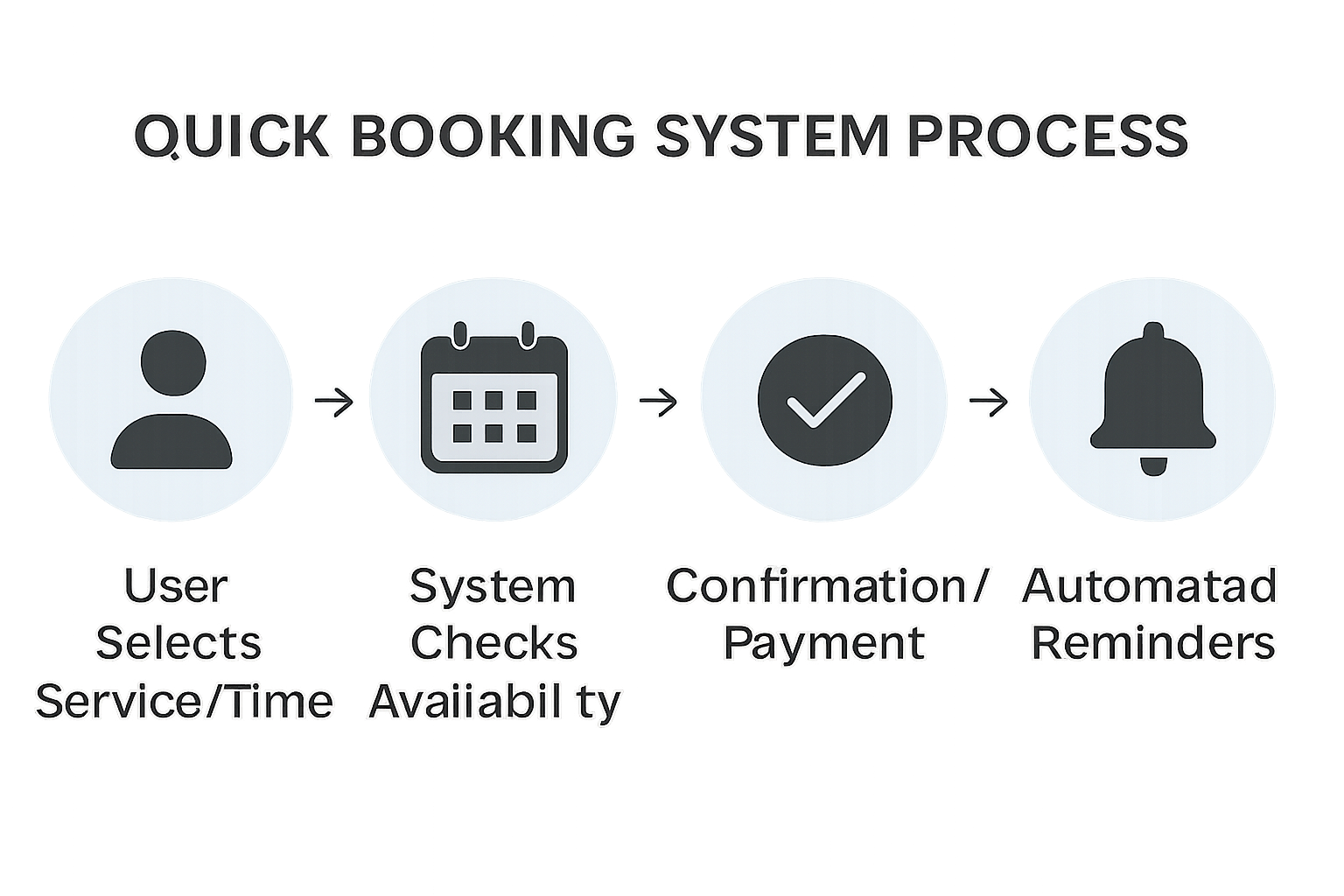
Quick Booking System Process: User journey from service selection to automated reminders
This diagram illustrates the user's journey from selecting a service and time, through the system checking availability, to confirmation and payment, and finally, automated reminders, highlighting the efficiency and user-friendliness of the booking process.
Simplify Payments & Track Transactions Easily
SmartPro provides a comprehensive and secure solution for managing all business payments and tracking financial transactions. This feature centralizes financial operations, offering secure payment processing, real-time transaction tracking, quick top-ups, and printable reports, ensuring businesses maintain complete control over their finances.
Secure Payment Processing
Secure Payment Processing is paramount in SmartPro, ensuring that all financial transactions are conducted safely and reliably. The platform integrates with trusted payment gateways, employing encryption and security protocols to protect sensitive financial data. This allows businesses to accept various payment methods with confidence, providing a secure and convenient experience for their clients.
Example: An online retail business using SmartPro can securely process credit card payments for customer orders, knowing that all transaction data is encrypted and protected against unauthorized access, thereby building customer trust and ensuring compliance with financial regulations.
Real-time Transaction Tracking
Real-time Transaction Tracking offers immediate visibility into all financial movements within the business. As payments are processed or funds are transferred, the system updates financial records instantly. This real-time insight enables businesses to monitor cash flow, reconcile accounts, and identify any discrepancies or fraudulent activities promptly, facilitating proactive financial management.
Example: A service provider can view a live feed of all incoming payments for services rendered, allowing them to quickly confirm successful transactions and manage their daily revenue. This immediate tracking helps in maintaining accurate financial records and making informed decisions about cash flow.
Quick Top-ups & History
Quick Top-ups & History provides an efficient way to manage and track prepaid services or client accounts with credit balances. Users can easily add funds to their accounts, and a detailed history of all top-ups and expenditures is maintained. This feature is particularly useful for businesses offering subscription models, retainers, or credit-based services, simplifying billing and reconciliation.
Example: A gym offering membership packages with a fixed number of sessions can allow members to quickly top up their session credits through the SmartPro platform. Both the gym and the member can view a complete history of all top-ups and session usage, ensuring transparency and ease of management.
Printable & Shareable Reports
Printable & Shareable Reports enable businesses to generate comprehensive financial summaries that can be easily printed or shared with stakeholders. These reports provide a clear overview of revenue, expenses, transaction volumes, and other key financial metrics. The ability to customize and export these reports in various formats facilitates financial analysis, tax preparation, and communication with accountants or investors.
Example: At the end of each month, a business owner can generate a detailed financial report from SmartPro, which includes a breakdown of income by service, payment method, and client. This report can then be easily shared with their accountant for tax filing purposes or used internally for performance review and strategic planning.
Secure Settings & AI Assistance
SmartPro prioritizes the security and privacy of its users while providing robust support mechanisms through integrated AI assistance. This feature set ensures that businesses can operate with peace of mind, knowing their data is protected and help is readily available.
Advanced Privacy Controls
Advanced Privacy Controls in SmartPro offer users granular control over their data and privacy settings. Businesses can define who has access to specific information, manage data sharing preferences, and ensure compliance with relevant data protection regulations. This level of control empowers users to customize their privacy posture according to their operational needs and legal obligations.
Example: A healthcare provider using SmartPro can configure privacy settings to ensure that only authorized personnel have access to sensitive patient information, thereby complying with patient confidentiality laws and building trust with their clientele.
Two-Step Verification
Two-Step Verification (2SV) adds an extra layer of security to user accounts, significantly reducing the risk of unauthorized access. By requiring a second form of verification in addition to a password (e.g., a code sent to a mobile device), 2SV protects accounts even if passwords are compromised. This is a critical security measure for safeguarding sensitive business data and client information.
Example: Before accessing their SmartPro dashboard, a business owner is prompted to enter a code sent to their registered mobile phone, in addition to their password. This ensures that even if their password falls into the wrong hands, their account remains secure.
User Access Management
User Access Management allows businesses to precisely control and manage the permissions and roles of different users within the SmartPro platform. Administrators can assign specific roles (e.g., administrator, manager, employee) with predefined access levels to various features and data. This ensures that each user has only the necessary access to perform their duties, enhancing security and operational efficiency.
Example: A large organization can use User Access Management to grant their marketing team access only to reporting and social automation features, while their finance team has access to payment and transaction tracking, preventing unauthorized access to irrelevant or sensitive data.
AI-Powered Support Chat
AI-Powered Support Chat provides instant assistance and support to SmartPro users directly within the platform. This intelligent chatbot can answer frequently asked questions, guide users through common tasks, troubleshoot minor issues, and provide quick access to relevant documentation. For more complex issues, it can seamlessly escalate to human support, ensuring continuous and efficient problem resolution.
Example: A new user struggling to set up their booking system can interact with the AI-powered support chat, which provides step-by-step instructions and links to relevant tutorials, helping them quickly overcome initial hurdles without waiting for human assistance.
Conclusion
SmartPro stands as a comprehensive and innovative platform designed to revolutionize business operations through its powerful suite of features. From insightful analytics and robust automation to seamless scheduling and secure financial management, SmartPro empowers businesses to enhance efficiency, foster growth, and deliver exceptional customer experiences. By integrating advanced technology with user-centric design, SmartPro provides a holistic solution for modern businesses seeking to thrive in a dynamic market. The platform's commitment to security, ease of use, and continuous innovation makes it an indispensable tool for businesses aiming to simplify their work and achieve sustained success.
References
- thesmartpro.io/features/
- thesmartpro.io/blog/
- PlatformFeaturesbyRoleReview.pdf
- Online Booking Platform Oman
- Online Booking System for Small Business
Product Roadmap Review
Strengths
- Clearly structures development into three logical phases (MVP, V1, Phase 2+)
- Provides specific deliverables for each phase with appropriate emoji indicators
- Balances immediate needs with long-term vision
- Includes bilingual considerations from the beginning
- Articulates clear outcomes for each development phase
Suggestions for Improvement
- Add estimated timelines or quarters for each phase
- Include resource requirements or team composition needs for each phase
- Provide more detail on technical dependencies between phases
- Add risk assessment and mitigation strategies for each phase
- Consider including key performance indicators (KPIs) to measure success of each phase
Missing Elements
- No specific timelines or deadlines for any phase
- Missing budget considerations or resource allocation information
- Lacks prioritization methodology for features within each phase
- No mention of user testing or feedback loops between phases
- Absence of go/no-go criteria for moving between phases
Overall Evaluation
| Criteria | Rating (1-5) | Notes |
|---|---|---|
| Relevance | 5 | Excellent alignment with business and market needs |
| Clarity | 4 | Clear phasing but lacks specific timelines |
| Strategic Value | 4 | Good balance of immediate needs and future vision |
| Criteria | Rating (1-5) | Notes |
|---|---|---|
| Strategic Value | ||
| Completeness | 3 | Good feature breakdown but missing timelines and resources |
| Differentiation | 4 | Strong focus on regional features and bilingual support |
Integration
Industry Standards & Best Practices
API-First Approach
- RESTful API Design: Follow REST principles with consistent resource naming, proper HTTP methods, and status codes
- OpenAPI/Swagger Documentation: Provide comprehensive, interactive API documentation
- Versioning Strategy: Implement clear API versioning (e.g., /api/v1/ ) to manage changes without breaking integrations
- Consistent Response Formats: Standardize error handling and response structures
Authentication & Security
- OAuth 2.0 & OpenID Connect: Industry standard for secure delegated access
- API Keys & JWT: For service-to-service authentication with appropriate scoping
- Rate Limiting & Throttling: Protect against abuse and ensure fair resource allocation
- Input Validation: Thorough validation of all incoming data to prevent injection attacks
- Encryption: TLS for transport and field-level encryption for sensitive data
Integration Patterns
- Webhook-Driven Events: Push notifications for real-time updates
- Polling with Pagination: For data synchronization with proper cursor-based pagination
- Bulk Operations: Support for efficient batch processing of multiple records
- Idempotent Operations: Ensure operations can be safely retried without side effects
- Event-Driven Architecture: Use message queues for reliable asynchronous processing
Regional Compliance Considerations
- Data Residency: Host sensitive data within Oman/GCC or use certified cloud providers
- Audit Trails: Comprehensive logging of all integration activities
- Privacy Controls: Granular permissions and consent management
- Digital Signatures: Compliance with local e-signature laws (Royal Decree 69/2008 in Oman)
- Government Standards: Alignment with national digital transformation initiatives
Successful Integration Models in Similar Platforms
Global Marketplace Platforms
- Upwork Enterprise API: Offers workforce management integrations with enterprise systems
- Fiverr Business: Provides SSO, procurement system integration, and team management APIs
- Thumbtack: Offers calendar sync, CRM integration, and payment gateway flexibility
Regional Success Stories
- Careem Super App: Unified API gateway connecting multiple service verticals
- Talabat/Delivery Hero: Integration framework for restaurants, payment systems, and delivery tracking
- Noon Marketplace: Seller API with inventory sync, order management, and logistics integration
Government Integration Examples
- UAE Pass: National digital identity system with standardized OAuth2 integration
- Saudi Etimad: Procurement platform with vendor verification API
- Oman's InvestEasy: Business registration verification with secure API access
Technical Implementation Approaches
API Gateway Architecture
- Benefits: Centralized security, monitoring, rate limiting, and transformation
- Popular Solutions: Kong, AWS API Gateway, Azure API Management
- Implementation Considerations: Caching, throttling, analytics, and developer portal
Middleware & Integration Layers
- Benefits: Decouples core systems, handles transformation, provides buffering
- Approaches: ESB, iPaaS, or lightweight message brokers
- Popular Solutions: MuleSoft, Apache Camel, or custom Node.js/Python services
Data Synchronization Strategies
- Real-time vs. Batch: Choose based on business requirements and system capabilities
- Change Data Capture: Track and propagate only changed records
- Conflict Resolution: Strategies for handling concurrent updates across systems
Testing & Monitoring
- Integration Testing: Automated tests for all integration points
- Synthetic Monitoring: Regular health checks of integration endpoints
- Observability: Comprehensive logging, tracing, and metrics for troubleshooting
GCC-Specific Integration Considerations
Data Protection & Privacy
- PDPL Compliance: Alignment with emerging data protection laws in GCC countries
- Cross-Border Data Flows: Management of data transfer between GCC countries
- Consent Management: Explicit user consent for data sharing across platforms
Digital Identity Integration
- National ID Systems: Integration with UAE Pass, Saudi Digital ID, Oman's PKI
- Business Verification: CR validation through official government APIs
- KYC/AML Requirements: Compliance with regional Know Your Customer standards
Localization Requirements
- Bilingual Support: All API responses and documentation in Arabic and English
- Date/Time Formats: Support for Hijri calendar and local time formats
- Currency Handling: Multi-currency support with proper formatting
Regional Payment Integration
- Local Payment Gateways: Integration with Tap, PayTabs, OmanNet, and bank-specific gateways
- Alternative Payment Methods: Support for cash on delivery, installment plans
- Compliance: Adherence to central bank regulations for payment processing
Recommended Integration Framework for SmartPRO Hub
Core Integration Architecture
- API Gateway + Middleware: Implement a dedicated gateway with transformation capabilities
- Event Bus: Add message queue for asynchronous processing and reliable delivery
- Integration Database: Consider a separate database for integration state management
Authentication Framework
- OAuth 2.0 Provider: Implement OAuth server for third-party integrations
- API Key Management: Self-service portal for partners to manage integration credentials
- Government ID Integration: Secure connectors to national identity systems
Developer Experience
- Developer Portal: Self-service documentation, API keys, and sandbox environment
- SDKs & Client Libraries: Pre-built integration code for common languages
- Webhooks Management: Self-service configuration of event subscriptions
Compliance & Security
- Audit Framework: Comprehensive logging of all integration activities
- Data Classification: Clear policies on what data can be shared with which systems
- Penetration Testing: Regular security assessment of integration points
Innovations
Executive Summary
Based on the comprehensive competitive analysis of global and regional platforms, this document extracts key best practices and innovative features that can be implemented in SmartPRO Hub. The focus is on actionable insights that address the unique needs of the GCC market while incorporating proven approaches from successful platforms globally.
User Onboarding & Verification
Best Practices to Implement
- Multi-layered Verification System
- Source: Upwork, Veriff
- Implementation: Combine government ID verification, skills assessment, and video introduction
- GCC Enhancement: Integrate with Oman National ID system and Commercial Registration (CR) verification APIs
- Priority: High
- Progressive Verification
- Source: Fiverr, Thumbtack
- Implementation: Start with basic verification for entry, then increase verification requirements as users seek higher status
- GCC Enhancement: Align verification tiers with local trust expectations and government requirements
- Priority: Medium
- Business Verification Badges
- Source: Thumbtack, Upwork Enterprise
- Implementation: Create distinct verification for businesses vs. individual providers
- GCC Enhancement: Add specific badges for locally registered businesses, with CR number display
- Priority: High
Innovative Features to Consider
- Ministry Integration Hub
- Concept: Direct API connections to multiple GCC government verification systems
- Benefit: Automated verification of business licenses, professional credentials, and residency status
- Implementation Complexity: High
- Differentiation Value: Very High
- Dialect-Based Matching
- Concept: Allow clients to specify preferred Arabic dialect for service providers
- Benefit: Enhanced communication and cultural alignment
- Implementation Complexity: Medium
- Differentiation Value: High
- Verification Video Prompts
- Concept: Randomized video verification questions in Arabic and English
- Benefit: Stronger identity verification and language proficiency confirmation
- Implementation Complexity: Medium
- Differentiation Value: Medium
Booking & Scheduling
Best Practices to Implement
- Integrated Calendar Management
- Source: HoneyBook, Thumbtack
- Implementation: Two-way calendar sync with major providers (Google, Outlook, Apple)
- GCC Enhancement: Support for Islamic calendar alongside Gregorian
- Priority: High
- Automated Booking Workflows
- Source: HoneyBook
- Implementation: Trigger-based workflows that automate follow-ups and confirmations
- GCC Enhancement: WhatsApp integration for notifications (dominant in GCC)
- Priority: High
- Availability Templates
- Source: Thumbtack, HoneyBook
- Implementation: Pre-set availability patterns that providers can quickly apply
- GCC Enhancement: Prayer time blocking and Friday prayer accommodation
- Priority: Medium
Innovative Features to Consider
- Prayer-Aware Scheduling
- Concept: Automatically block prayer times based on location and preferences
- Benefit: Culturally respectful scheduling that aligns with religious practices
- Implementation Complexity: Medium
- Differentiation Value: High
- WhatsApp Booking Bot
- Concept: Allow booking and confirmation entirely through WhatsApp
- Benefit: Meet users on their preferred communication platform
- Implementation Complexity: Medium
- Differentiation Value: High
- Family Booking Coordination
- Concept: Allow family members to coordinate service bookings (relevant for GCC family structures)
- Benefit: Align with cultural norms where family decisions are collaborative
- Implementation Complexity: Medium
- Differentiation Value: Medium
Contract Generation & Management
Best Practices to Implement
- Template Library with Localization
- Source: HoneyBook, Bonsai
- Implementation: Industry-specific contract templates with customization options
- GCC Enhancement: Bilingual contracts (Arabic/English) with proper legal terminology
- Priority: High
- E-Signature with Audit Trail
- Source: HoneyBook, DocuSign integration
- Implementation: Legally binding e-signatures with comprehensive activity logging
- GCC Enhancement: Compliance with Royal Decree 69/2008 (Oman) and equivalent GCC e-signature laws
- Priority: High
- Dynamic Field Population
- Source: Bonsai, HoneyBook
- Implementation: Auto-fill contracts with client and project details
- GCC Enhancement: Proper handling of Arabic names and addresses
- Priority: Medium
Innovative Features to Consider
- Dual-Language Contract Engine
- Concept: True bilingual contract generation with legal terminology verification
- Benefit: Contracts that are equally valid in Arabic and English
- Implementation Complexity: High
- Differentiation Value: Very High
- Ministry-Compliant Templates
- Concept: Contract templates pre-approved by relevant ministries
- Benefit: Faster approval and higher compliance
- Implementation Complexity: High
- Differentiation Value: Very High
- Voice Contract Summary
- Concept: AI-generated audio summary of contract terms in Arabic and English
- Benefit: Improved understanding and accessibility
- Implementation Complexity: Medium
- Differentiation Value: Medium
Payments & Escrow
Best Practices to Implement
- Milestone-Based Escrow
- Source: Upwork
- Implementation: Funds held in escrow and released upon milestone completion
- GCC Enhancement: Integration with local payment gateways (Tap, PayTabs, OmanNet)
- Priority: High
- Multiple Payment Methods
- Source: Fiverr, regional platforms
- Implementation: Support for credit cards, bank transfers, and digital wallets
- GCC Enhancement: Support for popular regional payment methods
- Priority: High
- Automated Invoicing
- Source: HoneyBook, Bonsai
- Implementation: Generate professional invoices automatically
- GCC Enhancement: VAT-compliant invoicing for each GCC country
- Priority: Medium
Innovative Features to Consider
- Multi-Currency Escrow
- Concept: Hold funds in client's preferred currency, pay out in provider's preferred currency
- Benefit: Reduced currency conversion fees and flexibility
- Implementation Complexity: High
- Differentiation Value: Medium
- Islamic Finance Compliance
- Concept: Option for contracts and payments to follow Islamic finance principles
- Benefit: Alignment with religious preferences of many GCC users
- Implementation Complexity: High
- Differentiation Value: High
- Government Tender Integration
- Concept: Special payment flows for government contracts
- Benefit: Streamlined process for lucrative government work
- Implementation Complexity: High
- Differentiation Value: Very High
Ratings, Reviews, and Trust Signals
Best Practices to Implement
- Comprehensive Rating System
- Source: Upwork, Fiverr
- Implementation: Multi-dimensional ratings (communication, quality, timeliness)
- GCC Enhancement: Culturally relevant rating categories
- Priority: High
- Verification Badges
- Source: Thumbtack, Upwork
- Implementation: Visual indicators of verification level and achievements
- GCC Enhancement: Government verification and professional association badges
- Priority: High
- Review Moderation
- Source: Fiverr, Upwork
- Implementation: Review screening to ensure quality and prevent abuse
- GCC Enhancement: Culturally sensitive moderation guidelines
- Priority: Medium
Innovative Features to Consider
- Trust Network Visualization
- Concept: Visual representation of professional connections and endorsements
- Benefit: Aligns with "wasta" concept important in GCC business culture
- Implementation Complexity: Medium
- Differentiation Value: High
- Ministry Endorsement System
- Concept: Official endorsements from relevant government ministries
- Benefit: Highest level of trust and credibility
- Implementation Complexity: Very High
- Differentiation Value: Very High
- Community Verification
- Concept: Allow established community members to vouch for new providers
- Benefit: Builds on cultural importance of personal recommendations
- Implementation Complexity: Medium
- Differentiation Value: Medium
Mobile Responsiveness & Multilingual Support
Best Practices to Implement
- True RTL Design
- Source: Regional platforms
- Implementation: Design specifically for right-to-left Arabic interface
- GCC Enhancement: Not just translation but cultural design elements
- Priority: Very High
- Language Toggle with Memory
- Source: Ureed
- Implementation: Easy switching between languages with preference memory
- GCC Enhancement: Support for Gulf Arabic dialect options
- Priority: High
- Mobile-First Design
- Source: Fiverr, Upwork mobile apps
- Implementation: Design for mobile first, then expand to desktop
- GCC Enhancement: Optimize for devices popular in GCC market
- Priority: High
Innovative Features to Consider
- Voice Navigation
- Concept: Arabic voice commands for hands-free navigation
- Benefit: Accessibility and convenience
- Implementation Complexity: High
- Differentiation Value: Medium
- Dialect Localization
- Concept: Support for multiple Arabic dialects beyond MSA
- Benefit: More natural and comfortable user experience
- Implementation Complexity: High
- Differentiation Value: Medium
- WhatsApp Business Integration
- Concept: Deep integration with WhatsApp for notifications and interactions
- Benefit: Meet users on their preferred platform
- Implementation Complexity: Medium
- Differentiation Value: High
Business Model & Monetization
Best Practices to Implement
- Tiered Commission Structure
- Source: Upwork, Fiverr
- Implementation: Decreasing commission rates as transaction volume increases
- GCC Enhancement: Special rates for GCC nationals (supporting nationalization)
- Priority: High
- Subscription Options
- Source: HoneyBook, Bonsai
- Implementation: Monthly subscription for power users with reduced per-transaction fees
- GCC Enhancement: Business packages aligned with local business structures
- Priority: Medium
- Featured Listings
- Source: Fiverr, Thumbtack
- Implementation: Premium placement for additional fees
- GCC Enhancement: Category sponsorship for industry leaders
- Priority: Medium
Innovative Features to Consider
- Government Contract Facilitation
- Concept: Specialized service for helping providers secure government contracts
- Benefit: Access to lucrative government sector with streamlined compliance
- Implementation Complexity: High
- Differentiation Value: Very High
- Nationalization Program Integration
- Concept: Special features supporting Omanization and similar GCC programs
- Benefit: Alignment with government priorities and potential subsidies
- Implementation Complexity: Medium
- Differentiation Value: High
- Business Formation Services
- Concept: Help freelancers establish formal businesses in GCC
- Benefit: Additional revenue stream and increased platform stickiness
- Implementation Complexity: High
- Differentiation Value: Medium
Technical Architecture & Implementation
Best Practices to Implement
- API-First Design
- Source: Veriff, modern platforms
- Implementation: Build all features as APIs first, then add UI
- GCC Enhancement: Design APIs with Arabic content handling in mind
- Priority: High
- Microservices Architecture
- Source: Modern platform architecture
- Implementation: Separate services for auth, booking, contracts, payments
- GCC Enhancement: Region-specific services for compliance
- Priority: Medium
- Comprehensive Analytics
- Source: Upwork, HoneyBook
- Implementation: Detailed tracking of user journeys and conversion
- GCC Enhancement: Region-specific metrics and benchmarks
- Priority: Medium
Innovative Features to Consider
- Hybrid Cloud Architecture
- Concept: Core data in Oman/GCC, non-sensitive functions in global cloud
- Benefit: Compliance with data residency while maintaining performance
- Implementation Complexity: High
- Differentiation Value: Medium
- AI-Powered Matching Engine
- Concept: Advanced matching of clients and providers based on multiple factors
- Benefit: Higher quality matches and satisfaction
- Implementation Complexity: High
- Differentiation Value: High
- Blockchain Verification
- Concept: Immutable record of credentials and reviews
- Benefit: Enhanced trust and portability of reputation
- Implementation Complexity: Very High
- Differentiation Value: Medium
Implementation Prioritization Matrix
| Feature | Business Impact | Technical Complexity | Regional Relevance | Overall Priority |
|---|---|---|---|---|
| Dual-Language Contract Engine | Very High | High | Very High | 1 |
| Ministry Integration Hub | Very High | High | Very High | 2 |
| WhatsApp Integration | High | Medium | Very High | 3 |
| True RTL Design | High | Medium | Very High | 4 |
| Milestone-Based Escrow | High | Medium | High | 5 |
| Prayer-Aware Scheduling | Medium | Medium | Very High | 6 |
| Islamic Finance Compliance | Medium | High | High | 7 |
| Trust Network Visualization | Medium | Medium | High | 8 |
| Government Contract Facilitation | High | High | High | 9 |
| Multi-Currency Escrow | Medium | High | Medium | 10 |
Phased Implementation Approach
Phase 1: Foundation (Weeks 1-3)
- True RTL Design implementation
- Basic verification system
- Integrated calendar with prayer time awareness
- Bilingual interface (Arabic/English)
- Core payment processing with local methods
Phase 2: Core Differentiation (Weeks 4-6)
- Dual-Language Contract Engine
- WhatsApp integration for notifications
- Milestone-based escrow system
- Business verification badges
- Enhanced mobile experience
Phase 3: Advanced Features (Weeks 7-8)
- Ministry Integration Hub (initial implementation)
- Trust Network Visualization
- Advanced booking workflows
- Featured listings and promotion options
- Analytics and reporting
Future Phases
- Government Contract Facilitation
- Islamic Finance Compliance
- Ministry Endorsement System
- AI-Powered Matching Engine
- Blockchain Verification
Conclusion
This analysis of best practices and innovative features provides a clear roadmap for implementing SmartPRO Hub with strong differentiation in the GCC market. By prioritizing features that combine technical excellence with deep cultural and regional relevance, SmartPRO Hub can create a unique value proposition that addresses the specific needs of service providers and clients in Oman and the broader GCC region.
The implementation approach focuses on building a solid foundation with core differentiators in the initial MVP, while planning for more advanced features in subsequent phases. This balanced approach ensures a timely launch while establishing a clear path to competitive advantage through regional specialization.
Design
Overview
This document outlines a structured approach for collecting and incorporating user feedback on the SmartPRO Hub design system. The feedback process is designed to validate the Arabic-first, mobile-first approach and ensure cultural relevance for GCC markets.
Feedback Collection Methods
1. Stakeholder Reviews
Participants: Key project stakeholders, product owners, and business representatives
Focus Areas:
- Strategic alignment with business goals
- Brand consistency and visual identity
- Feature completeness and priority
- Market positioning and competitive differentiation
Process:
- Present design system components in a structured walkthrough
- Collect feedback using a standardized evaluation form
- Prioritize feedback based on business impact and implementation feasibility
2. User Testing Sessions
Participants: Representative users from target segments (service providers and clients)
Focus Areas:
- Usability and intuitiveness of core flows
- Cultural relevance and appropriateness
- Language preferences and bilingual experience
- Mobile and desktop experience
Process:
- Conduct 30-45 minute moderated testing sessions
- Use task-based scenarios covering key user journeys
- Record sessions for detailed analysis
- Collect both quantitative metrics and qualitative feedback
3. Technical Implementation Review
Participants: Development team, front-end engineers
Focus Areas:
- Technical feasibility of design specifications
- Implementation complexity and potential challenges
- Performance considerations for mobile devices
- RTL implementation and localization approach
Process:
- Technical walkthrough of component specifications
- Code prototype of key components
- Identify potential technical constraints or optimizations
Feedback Prioritization Framework
Feedback will be evaluated and prioritized using the following criteria:
Priority Criteria
Critical
- Blocks core user flows
- Cultural or religious sensitivity issues
- Accessibility barriers
- Technical infeasibility
High
- Significant usability issues
- Brand inconsistency
- Mobile experience problems
- RTL implementation issues
Medium
- Visual refinements
- Interaction improvements
- Content clarity issues
- Secondary flow optimizations
Low
- Minor visual adjustments
- Nice-to-have features
- Edge case scenarios
- Future enhancement ideas
Iteration Process
Phase 1: Initial Feedback Collection
Timeline: 1 week
- Distribute design specifications to stakeholders
- Schedule and conduct initial user testing sessions
- Technical review with development team
Phase 2: Analysis and Prioritization
Timeline: 2-3 days
- Compile all feedback into a centralized document
- Categorize issues by component and priority
- Create an iteration plan with specific design tasks
Phase 3: Design Refinement
Timeline: 1-2 weeks
- Address critical and high-priority feedback
- Update component specifications and wireframes
- Document design decisions and rationale
Phase 4: Validation
Timeline: 3-5 days
- Review updated designs with stakeholders
- Conduct follow-up testing on refined components
- Finalize design system documentation
Documentation and Tracking
All feedback and iterations will be documented in a structured format:
Component: [Component Name]
Feedback Source: [Stakeholder/User Testing/Technical Review]
Issue Description: [Detailed description of the feedback]
Priority: [Critical/High/Medium/Low]
Proposed Solution: [Design approach to address the feedback]
Implementation Status: [Pending/In Progress/Completed]
Validation Status: [Pending/Validated]
Cultural Considerations
Special attention will be given to feedback related to:
- Prayer time integration and religious considerations
- Arabic typography and text rendering
- Regional payment preferences and methods
- Date and time formatting (Gregorian and Hijri)
- Gender and cultural sensitivity in imagery and language
- Regional business etiquette and communication norms
Next Steps
- Schedule initial stakeholder review session
- Recruit participants for user testing
- Prepare testing scenarios and evaluation criteria
- Set up feedback tracking system
- Brief development team on technical review requirements
This structured approach will ensure that the SmartPRO Hub design system evolves based on real user needs while maintaining its Arabic-first, mobile-first, and culturally sensitive approach.
Architecture
Current Technical Architecture
Based on the information provided, SmartPRO Hub's current architecture consists of:
Frontend Framework
React (via v0.dev)
- UI Design: Professional, enterprise-grade design system
- Responsiveness: Designed for desktop and mobile experiences
- Language Support: English-first with Arabic support planned
Backend Core Platform
Supabase
- Database: PostgreSQL
- Security Model: Row-Level Security (RLS) policies
- Serverless Functions: Edge Functions for custom logic
- Storage: Supabase Storage for documents, contracts, and media
Authentication & Authorization
Auth Provider: Supabase Auth
- Authentication Methods: JWT-based, email/password + magic link
- Role-Based Access: Client, Provider, Admin roles with specific permissions
- Future Plans: Potential expansion to include government ID verification
APIs & Integration Points
API Types: REST and Supabase RPC/Edge Functions
- Extensibility: Expandable to GraphQL if needed
- Current Integrations: Stripe (payments), Calendly (via Zapier)
- Webhook Support: Available through custom Edge Functions
Data Management
- Document Storage: Contracts, IDs, invoices, CRs
- File Handling: Supabase Storage
- Notifications: Via custom Edge Functions or webhooks
Integration Readiness Assessment
Strengths
- Modern Stack: The React + Supabase architecture provides a solid foundation for modern API integrations
- API-First Approach: REST APIs and Edge Functions enable flexible integration patterns
- Authentication Framework: JWT-based authentication can be extended to support OAuth2/SAML
- Security Model: Row-Level Security provides granular data access control
- Existing Integrations: Experience with Stripe and Zapier demonstrates integration capability
Gaps & Challenges
- API Documentation: No mention of comprehensive API documentation for external consumers
- Integration Framework: No dedicated middleware or integration layer mentioned
- Regional Compliance: Need for alignment with Omani/GCC data residency and security requirements
- Arabic Support: Full RTL and Arabic language support needed for government integrations
- Identity Verification: Current auth system lacks integration with national ID systems
Technical Integration Capabilities
| Capability | Status | Notes |
|---|---|---|
| REST API Endpoints | Available | Through Supabase and Edge Functions |
| OAuth2/SAML Support | Extendable | Not currently implemented but possible |
| Webhook Processing | Available | Through Edge Functions |
| Event-Driven Architecture | Partial | Can be enhanced |
| API Rate Limiting | Unknown | May need implementation |
| Data Transformation | Available | Through Edge Functions |
| Monitoring & Logging | Unknown | May need enhancement |
Recommendations for Architecture Enhancement
API Gateway Layer
Implement a dedicated API gateway to manage external integrations, security, and rate limiting
Integration Middleware
Consider adding a middleware layer for complex integrations requiring data transformation
Comprehensive API Documentation
Develop OpenAPI/Swagger documentation for all endpoints
Enhanced Authentication
Extend authentication to support OAuth2 for third-party integrations
Compliance Framework
Implement logging and audit trails that meet regional regulatory requirements
Data Residency Solution
Evaluate Oman-based hosting options for sensitive data
Integration Testing Framework
Develop automated testing for integration endpoints
Integration Architecture Diagram
+=========================================================================================================+
|                                    SmartPRO Hub Platform                                                |
+=========================================================================================================+
                                           |
                                           v
+-----------------------------+-----------------------------+---------------------------------------------+
|        Frontend             |         Backend              |           Integration Layer                |
|        (React)              |       (Supabase)            |                                            |
+-------------+---------------+-------------+---------------+-----------------+---------------------------+
              |                             |                                 |
              v                             v                                 v
+-----------------------------+-----------------------------+---------------------------------------------+
|      UI/UX Components       |         Database            |              API Gateway                    |
|                             |      (PostgreSQL)           |                                            |
|  * User Interface           |                             |  * Request Routing                         |
|  * Responsive Design        |  * User Data                |  * Authentication                          |
|  * RTL Support              |  * Service Records          |  * Rate Limiting                           |
|  * Mobile Optimization      |  * Contract Storage         |  * Data Transformation                     |
|  * Arabic Localization      |  * Payment History          |  * Error Handling                          |
|  * Real-time Updates        |  * Audit Logs               |  * Monitoring & Analytics                  |
+-------------+---------------+-------------+---------------+-----------------+---------------------------+
              |                             |                                 |
              v                             v                                 v
+-----------------------------+-----------------------------+---------------------------------------------+
|      Auth System            |        Storage              |           Event Bus                         |
|    (JWT + OAuth2)           |       (Supabase)            |                                            |
|                             |                             |  * Real-time Notifications                 |
|  * User Authentication      |  * Document Storage         |  * Webhook Processing                      |
|  * Role-based Access        |  * Contract Files           |  * Message Queuing                         |
|  * Session Management       |  * Media Files              |  * Event Logging                           |
|  * Security Policies        |  * Backup & Recovery        |  * Integration Events                      |
|  * Multi-factor Auth        |  * Version Control          |  * System Synchronization                  |
+-------------+---------------+-------------+---------------+-----------------+---------------------------+
              |                             |                                 |
              v                             v                                 v
+-----------------------------+-----------------------------+---------------------------------------------+
|    Payment Gateways         |      Government Portals     |           Identity Services                |
|                             |                             |                                            |
|  * Stripe Integration       |  * Oman National ID         |  * eSignature Services                     |
|  * Local Payment Methods    |  * Commercial Registration  |  * Digital Identity Verification          |
|  * Multi-currency Support   |  * Business License APIs    |  * KYC/AML Compliance                      |
|  * Escrow Management        |  * Tax Authority Integration|  * Document Verification                  |
|  * Invoice Generation       |  * Regulatory Compliance    |  * Biometric Authentication               |
|  * Payment Analytics        |  * Audit Trail Integration  |  * Trust Score Calculation                |
+-------------+---------------+-------------+---------------+-----------------+---------------------------+
              |                             |                                 |
              v                             v                                 v
+-----------------------------+-----------------------------+---------------------------------------------+
|      CRM/Business           |      Regional Compliance    |           External APIs                     |
|      Integration            |                             |                                            |
|                             |  * GCC Data Residency       |  * Third-party Services                    |
|  * Customer Management      |  * Privacy Regulations      |  * Calendar Integration                    |
|  * Lead Tracking            |  * Local Business Rules     |  * Communication APIs                      |
|  * Sales Pipeline           |  * Cultural Adaptations     |  * Analytics Services                      |
|  * Business Intelligence    |  * Regional Standards       |  * Marketing Tools                         |
|  * Reporting Dashboard      |  * Compliance Monitoring    |  * Social Media Integration               |
+-----------------------------+-----------------------------+---------------------------------------------+
This analysis provides a foundation for developing a comprehensive integration strategy that aligns with SmartPRO Hub's business objectives and technical capabilities.
Pain Points
Strengths
- Clearly identifies six specific pain points in the regional business services landscape
- Uses descriptive headers that immediately communicate the problem
- Provides detailed explanations of each pain point with real-world context
- Connects pain points directly to business impact and consequences
- Concludes with a strong statement about SmartPRO Hub's response to these challenges
Suggestions for Improvement
- Support pain points with specific market statistics or research data
- Add brief customer quotes or testimonials to validate each pain point
- Consider a visual representation (e.g., heat map or impact matrix) to show severity of each pain point
- Prioritize the pain points based on market research or customer feedback
- Include brief examples of how competitors are failing to address these specific pain points
Missing Elements
- No quantification of business impact (e.g., time or money lost due to each pain point)
- Lacks reference to any market research or validation studies conducted
- No mention of how these pain points differ across market segments (SMEs vs. enterprises)
- Absence of industry-specific pain points that might be particularly relevant
Overall Evaluation
| Criteria | Rating (1-5) | Notes |
|---|---|---|
| Relevance | 5 | Excellent identification of regional market challenges |
| Criteria | Rating (1-5) | Notes |
|---|---|---|
| Clarity | 4 | Clear explanations but could benefit from data support |
| Strategic Value | 4 | Strong foundation for product positioning |
| Completeness | 3 | Good coverage but lacks quantitative validation |
| Differentiation | 4 | Effectively highlights regional-specific challenges |